

Introduction
Are you pouring budget into Google Ads but watching your cost per lead climb with no end in sight? You adjust a bid here, swap a headline there — and still nothing moves. The frustrating truth is that most advertisers are focused on the wrong dials entirely.
The problem isn’t your budget. It’s not even your industry. It’s that Google Ads has dozens of settings and variables, but only a handful of levers actually control your Google Ads cost per lead. Pull the wrong ones and you’ll spin your wheels indefinitely. Pull the right ones and your CPL can drop significantly — often within days.
In this guide, you’ll discover the proven Google Ads levers that genuinely impact cost per lead, why they work, and exactly how to use them to drive more conversions without increasing spend.
Why Most Google Ads Advice Doesn’t Lower Your CPL
The internet is flooded with generic Google Ads tips — ‘use negative keywords,’ ‘write better ads,’ ‘increase your Quality Score.’ While none of these are wrong, they treat symptoms rather than root causes. Your cost per lead is the output of a system, and to change the output, you need to understand which inputs actually move the needle.
Think of your Google Ads account like an engine. There are hundreds of components, but only a few determine how efficiently it runs. The levers covered in this article are those high-leverage components — the ones that experienced PPC managers manipulate first because they know they’ll see results fastest.
The Core Google Ads Levers That Control Cost Per Lead
Lever 1: Keyword Match Type Strategy
Match types are one of the most misunderstood yet highest-impact levers in Google Ads. Your choice between broad, phrase, and exact match determines who sees your ad — and poor match type selection is one of the fastest ways to inflate CPL.
- Broad match: Reaches the widest audience but triggers irrelevant searches, wasting budget.
- Phrase match: Balances reach and relevance, showing ads when your keyword phrase appears in the query.
- Exact match: Most targeted, lowest CPL potential, but limits volume.
The lever to pull: Audit your Search Terms Report weekly. Any query converting at 2x or more of your CPL goal should be added as a negative keyword. High-converting queries should be promoted to exact match in their own ad group for tighter control.
Lever 2: Quality Score Optimization
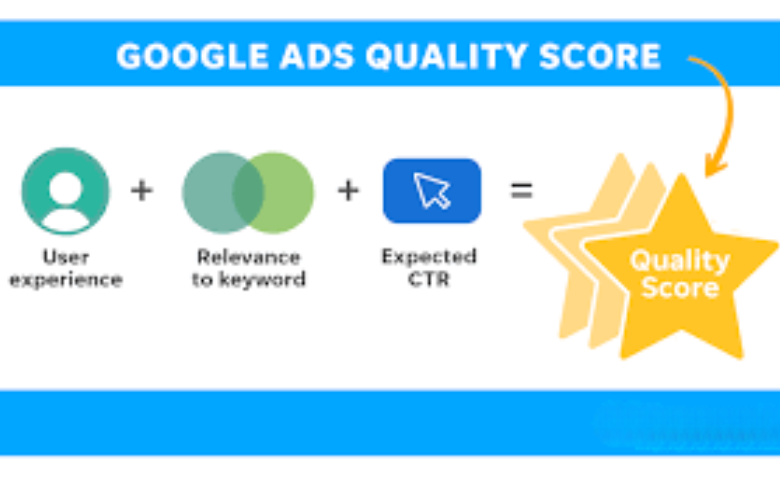
Quality Score is Google’s rating of the relevance and quality of your keywords, ads, and landing pages. It directly impacts both your Ad Rank and your cost per click. Among the Core Google Ads Levers, optimizing Quality Score is crucial, because improving it can significantly lower what you pay for each click while boosting campaign performance.
Quality Score has three components that you can directly influence:
- Expected Click-Through Rate (CTR): How likely Google thinks users are to click your ad.
- Ad Relevance: How closely your ad copy matches the searcher’s intent.
- Landing Page Experience: Whether your landing page is relevant, fast, and useful.
The lever to pull: Group keywords tightly by theme in Single Keyword Ad Groups (SKAGs) or tightly themed ad groups. Write ad copy that mirrors the exact keyword intent. Send traffic to dedicated landing pages, not your homepage.
Lever 3: Bid Strategy Selection
Choosing the wrong bid strategy can inflate your CPL by 50–100% or more. Google’s automated bidding strategies are powerful — but only when they have enough conversion data to learn from.
- Target CPA (tCPA): Tell Google your goal CPL and let Smart Bidding optimize bids in real-time. Requires a minimum of 30–50 conversions per month to perform well.
- Maximize Conversions: Good for campaigns with low volume — pushes for the most conversions within budget.
- Manual CPC: Gives you full control but requires constant management. Best for new campaigns or low-volume niches.
The lever to pull: If you have sufficient conversion data, switch to tCPA. Start by setting your target 20–30% higher than your current average CPL, then gradually lower it as Google learns. Never cut your target CPA aggressively in one step — it destabilizes the algorithm.
Lever 4: Ad Schedule & Dayparting
Not all hours perform the same. Your CPL can fluctuate significantly depending on the time of day, day of the week, or even the month. Without dayparting, you may end up paying the same for clicks at 3 AM on a Sunday as you would during peak business hours.
The lever to pull: Pull your Segment data by hour and by day. Identify time windows where your conversion rate is significantly below average or your CPC is unusually high. Apply bid adjustments (or exclude those windows entirely) to eliminate wasteful spend.
Lever 5: Audience Layering and Bid Adjustments
Google Ads lets you layer audiences — remarketing lists, Customer Match, in-market segments, demographics — on top of your keyword campaigns. This is one of the most underused CPL reduction levers available.
- RLSA (Remarketing Lists for Search Ads): Bid higher on users who have already visited your site — they convert at 2–3x the rate of cold traffic.
- Customer Match: Upload your existing customer or lead list and exclude them from prospecting campaigns to avoid wasted spend.
- Demographic exclusions: Identify age, gender, or household income segments that consistently show poor conversion rates and reduce or exclude bids.
Lever 6: Landing Page Conversion Rate
Your CPL is a product of two variables: cost per click (CPC) and landing page conversion rate (CVR). Most advertisers obsess over reducing CPC while ignoring CVR — yet a 2x improvement in conversion rate produces the same CPL reduction as cutting your CPC in half.
High-impact landing page elements to test:
- Above-the-fold headline that mirrors the ad’s keyword intent
- A single, clear call-to-action — no menu, no distractions
- Trust signals: testimonials, logos, certifications
- Form length: fewer fields consistently increase conversion rate
- Page speed: every second of load time increases bounce rate significantly
The lever to pull: A/B test your landing pages with tools like Google Optimize or VWO. Even a 10% improvement in CVR translates directly to a 10% reduction in CPL.
Lever 7: Negative Keyword Management
Negative keywords are perhaps the fastest way to immediately lower your CPL. Every irrelevant click you stop paying for is money redirected toward clicks that actually convert.
Build your negative keyword lists across three levels:
- Account-level negatives: Brand competitors, irrelevant industries, job-seeker terms (e.g., ‘jobs’, ‘salary’, ‘free’).
- Campaign-level negatives: Terms relevant to other campaigns but not this one.
- Ad group-level negatives: Cross-contamination between ad groups in the same campaign.
The lever to pull: Review your Search Terms Report at least weekly. Set up a shared negative keyword list in the Shared Library and apply it across campaigns for consistency.
Images & Media Optimization

While this article is text-focused, if you’re publishing this on a blog or content platform, optimizing your media assets will strengthen your on-page SEO and improve user engagement — both of which indirectly support your organic performance alongside your paid efforts.
- Use relevant screenshots: Include actual Google Ads screenshots showing Quality Score breakdowns, Search Terms Reports, or bid strategy settings. These build credibility and visual interest.
- Compress image sizes: Use tools like TinyPNG or ShortPixel to keep images under 100KB without visible quality loss. Page speed is a landing page lever — slow pages kill CPL.
- Add descriptive ALT text: Use keyword-rich but natural alt text, such as ‘Google Ads cost per lead optimization — bid strategy settings screenshot.’
External Resources & Further Reading
For deeper research on the levers covered in this guide, the following authoritative sources are recommended:
- Google Ads Help Center — Official documentation on bid strategies, Quality Score, and audience targeting
- WordStream Blog — Data-driven benchmarks on average CPL by industry
- HubSpot Marketing Blog — Landing page conversion rate optimization frameworks
- Search Engine Journal — Up-to-date PPC strategy and Google Ads algorithm changes
Cross-referencing your own account data with industry benchmarks is the most reliable way to identify which levers will have the biggest impact in your specific context.
FAQs
A: The effectiveness of Core Google Ads Levers depends heavily on your industry, average deal value, and close rate. As a general benchmark, your CPL should stay within 10–20% of the average revenue generated by a new customer. Use Google’s industry benchmark reports and compare your CPL with competitors to set a realistic target.et.
A: Some levers produce results within days — adding negative keywords, tightening match types, or excluding underperforming ad schedules can lower CPL almost immediately. Others, like Quality Score improvements or landing page CRO, take weeks to register fully. A structured optimization plan targeting 2–3 levers per week typically shows meaningful CPL reductions within 30–60 days.
A: Target CPA is typically more effective for accounts with 30+ conversions per month, as Google’s Smart Bidding algorithm has enough data to make accurate real-time bid decisions. For newer accounts or those with low volume, Manual CPC or Maximize Conversions is usually more reliable. Always transition gradually between strategies — sudden changes disrupt the algorithm’s learning phase.
A: Quality Score directly affects your cost per click. A higher Quality Score means you pay less for the same ad position compared to a competitor with a lower score. Since CPL = CPC ÷ Conversion Rate, lowering CPC through Quality Score improvements directly reduces your cost per lead without requiring any changes to your budget or bids.
A: Both matter equally in the CPL equation, but conversion rate optimization often delivers larger, faster gains. Most advertisers have already squeezed significant efficiency from their bidding, whereas many landing pages remain largely untested. A landing page that converts at 5% instead of 2.5% cuts your CPL in half — equivalent to halving your cost per click.
Conclusion
Lowering your Google Ads cost per lead is not about randomly tweaking settings and hoping for the best. It’s about understanding which levers actually drive performance — and pulling them in the right order, with the right data.
